I have great news for you folks! Mr. Guy, the same guy to bring you the Pixel Qi toggle app, has now booted Honeycomb on the Adam. It is in very early stages, but it is booted, and that we can build upon. Now it's your turn devs. Take this pice of work to make an awesome ROM complete with NI apps. We are waiting.
As you can see in the video below, it is still pre-alpha, but it is on its way. This particular ROM appears to be from the EeePad Transformer. The original post can be found here. The devs at TabletROMs.com re doing good!
(Update)
Help make the ROM stable to get a piece of the bounty. You will be rewarded for your dev efforts. How can you lose? See: http://tabletroms.com/forums/content.php?4-Stabilize-the-HC-Rom
Thursday, May 5, 2011

Saturday, April 30, 2011
Completly Updated Eden Coming to Adam
We have had light shed upon us this morning in the the latest Notion Ink blog post. The major update that was barely mentioned in the last post got a list of details to go with the images today. The details show that this really is a major update instead of a design change.
The biggest bullet of the list is the core OS. The Adam will get Gingerbread after all. The delay on Honeycomb made them change their minds most likely. Eden needed a lot of improvement and Honeycomb isn't available as grounds for such improvement. The kernel is also getting a nice revamp for you developers out there. To give you ROM developers a nod, the link for the kernel source was thrown up on the blog post at the very top.
Another amazing bullet point is the addition of an overclocked Tegra processor. This could be taken many ways as it is listed as "optimally overclocked". That could just mean that it isn't downclocked by Eden anymore.
Many software additions and changes will take place. Many such additions include chords for music, the weather app, books, and flash pre-installed (sorry, no genesis). Rohan makes mentioned of a completly different browser, which would be nice considering the Eden browser that I'm typing this post on is very half-baked. Take a gander at the full post here .
The biggest bullet of the list is the core OS. The Adam will get Gingerbread after all. The delay on Honeycomb made them change their minds most likely. Eden needed a lot of improvement and Honeycomb isn't available as grounds for such improvement. The kernel is also getting a nice revamp for you developers out there. To give you ROM developers a nod, the link for the kernel source was thrown up on the blog post at the very top.
Another amazing bullet point is the addition of an overclocked Tegra processor. This could be taken many ways as it is listed as "optimally overclocked". That could just mean that it isn't downclocked by Eden anymore.
Many software additions and changes will take place. Many such additions include chords for music, the weather app, books, and flash pre-installed (sorry, no genesis). Rohan makes mentioned of a completly different browser, which would be nice considering the Eden browser that I'm typing this post on is very half-baked. Take a gander at the full post here .
Thursday, April 28, 2011
Notion Ink Adam ROM Review: Cyanogen Mod 7 (Beta1)
Cyanogen Mod is probably the most popular Android ROM of all time, and it is now making its way to the Adam. Also included is the Honeycomb mimicking Tablet Tweaks plugin (also beta). I say making its way because it is still in beta. I had a minimal amount of problems with stability, but I recommend waiting as this won't be your daily donut. Find out how the popular ROM runs on a not-so-standard tablet.
 If you hate everything about Eden, even the apps, then this is definitely the ROM for you. All traces of Notion Ink have been wiped clean. This could be a good thing for some users, but not this guy. Couldn't they at least give us the NI keyboard? The purpose of CM7 is to give a vanilla Gingerbread experience, but oddly the stock Android launcher is MIA, instead giving you ADW and VTL to pick from.
As with a few other ROMs, you are given toggles for things like switching the SD cards or turning off cell standby. To do so, you are given the horrible not very intuitive Adam toggles app. All the app is is a screen with four buttons for the four toggles. No visual indication that the toggle worked, no prompting to restart, just four buttons.
Tablet Tweaks was suppose to give a Honeycomb-like feel to the overall experience. It doesn't. All you really get is a fat status bar with three navigation buttons that hardly ever goes away. Oh, and you can move it to the bottom of the screen if so desired. It's a nice idea, but it doesn't really add anything to the user experience.
There you have it. A brief review of a very popular ROM that almost doesn't need a review. For a complete list of features that CM will give you, go to their website. Right now, it isn't ready for the Adam. One major problem I had was the lack of a lockscreen which would probably be fixed by a simple data wipe. This ROM gets a 3/10 in its current form. The reason? A complete lack of anything Notion Ink.

As with a few other ROMs, you are given toggles for things like switching the SD cards or turning off cell standby. To do so, you are given the
Tablet Tweaks was suppose to give a Honeycomb-like feel to the overall experience. It doesn't. All you really get is a fat status bar with three navigation buttons that hardly ever goes away. Oh, and you can move it to the bottom of the screen if so desired. It's a nice idea, but it doesn't really add anything to the user experience.
There you have it. A brief review of a very popular ROM that almost doesn't need a review. For a complete list of features that CM will give you, go to their website. Right now, it isn't ready for the Adam. One major problem I had was the lack of a lockscreen which would probably be fixed by a simple data wipe. This ROM gets a 3/10 in its current form. The reason? A complete lack of anything Notion Ink.
Engadget Reviews Notion Ink Adam
All I can say is finally! We (or I at least) have been waiting for a professional review of the Adam since it came out. Since all orders were shipped a while back, it's hard to tell what took them so long. They had some interesting things to say about the tablet. Most of them were bad, but they were also true. They main target of the negativity was, of course, the software and the screen. What else did they say? Read on.
 The Adam only did good enough to deserve a lousy 3 out of 10 rating from the big shots. The software was called upon repeatedly for being slow and buggy. They even went as far as calling it "beta at best". Not a goos sign. They seemed particularly proud of their discovery of a way to make the browser crash on command (multiple taps on the tab wheel). The panels got a nice little overview as to how they worked and such. A small item they touched on was the lack of responsiveness from the capacitive digitizer. It was blamed on the screen protector, but as I found out the screen protector has nothing to do with the lack of touch sensitivity, it is just another one of the tablet's quirks. Oddly, no mention was made about the low wifi signal.
Engadget did have a couple of good thing to say about Notion Ink's baby. The ports... lots and lots of ports to fill your nerdy heart with joy. It use a "unique" design and an awesome sun-readable display. That was about it on the good side.
Like everyone that has an Adam knows, the viewing angles are awful, the camera is funky at best, and the software is just bad out of the box. Engadget just reaffirmed what we already knew, but it's nice to hear from the pros. You know Notion Ink didn't do terribly great with their first product when Engadget calls it a prototype running beta software. Get the full review here: http://www.engadget.com/2011/04/27/notion-ink-adam-review/

Engadget did have a couple of good thing to say about Notion Ink's baby. The ports... lots and lots of ports to fill your nerdy heart with joy. It use a "unique" design and an awesome sun-readable display. That was about it on the good side.
Like everyone that has an Adam knows, the viewing angles are awful, the camera is funky at best, and the software is just bad out of the box. Engadget just reaffirmed what we already knew, but it's nice to hear from the pros. You know Notion Ink didn't do terribly great with their first product when Engadget calls it a prototype running beta software. Get the full review here: http://www.engadget.com/2011/04/27/notion-ink-adam-review/
Sunday, April 24, 2011
Silence is Golden - Gold Holds No Value in the Notion Ink Community
It's been a long time since we last spoke. Does that sound familiar? It should. That is how Rohan started a few of his blog posts back when the official Notion Ink blog started to show signs of dying. Now he needs to start off every post with that little phrase. What has happened to the "family"? Where has the constant knowledge gone?

The journey started way back in April (last year) when the blog was officially opened. The promise of the ultimate Android tablet kept people flocking. The teasing and constant flow of information kept the people coming back for more. The Adam would have been a beast if it were released last summer. No competition could match it on the specs. And then came the delays.
Delay one with some investor issues. It was suppose to arrive sometime around Thanksgiving. In the weeks counting up to Thanksgiving we got post after post describing one bit of information at a time about the Adam. Weekend Specials he called them. It gave would be buyers a particular date to look forward to for more information. We knew everything about the Adam aside from a few crucial details.
Would the Adam come with the Android Market? Nobody knew. It took an interview with Android Police to find out, and that was after the pre-order had started. Another piece of the puzzle that was completely missing was a demonstration of the actual device. We had screenshots, renders, photos, prototype photos, but no videos or photos of the actual production Adam. We were expected to buy out of trust, and many of us did.
After the backlash of concern about a pre-order for an unknown product Rohan took charge of the situation by giving the videos we wanted. We didn't just get a video of the Adam doing its thing, we got a video demonstration every day. Now we knew everything about the Adam and how to use it once it arrived. This device still hadn't shipped to anyone.
In January, the videos stopped because it was the time of year for CES 2011. That was a disappointment. Notion Ink didn't have a booth for whatever reason, and nobody knew they were their. Slashgear and Engadget seemed to be the only media folks that gave them any type of coverage. Maybe because they were looking for Rohan? From Engadget and Slashgear the Adam got excellent "reviews". Strangely, we have yet to receive an actual review on the Adam from either blog even though they said it was coming.
CES marked the beginning of the end for Notion Ink's blogging record. Shipping delays and bricked Adam's destroyed the company's reputation overnight. Many people were angry; many people cancelled their order. Some people didn't even get an Adam until March. The customers that had their orders pushed backed several months didn't like silence on the blog very much either. Emails to support didn't bring back anything either.
We know Rohan has something to blog about. The last post gave a hint of the next major software update for the Adam. Can't he give us a little teaser every weekend about the update like he's done before? Is he afraid of making promises he can't keep? Just put a little disclaimer at the bottom saying details may vary. We don't like being kept in the dark.

The journey started way back in April (last year) when the blog was officially opened. The promise of the ultimate Android tablet kept people flocking. The teasing and constant flow of information kept the people coming back for more. The Adam would have been a beast if it were released last summer. No competition could match it on the specs. And then came the delays.
Delay one with some investor issues. It was suppose to arrive sometime around Thanksgiving. In the weeks counting up to Thanksgiving we got post after post describing one bit of information at a time about the Adam. Weekend Specials he called them. It gave would be buyers a particular date to look forward to for more information. We knew everything about the Adam aside from a few crucial details.
Would the Adam come with the Android Market? Nobody knew. It took an interview with Android Police to find out, and that was after the pre-order had started. Another piece of the puzzle that was completely missing was a demonstration of the actual device. We had screenshots, renders, photos, prototype photos, but no videos or photos of the actual production Adam. We were expected to buy out of trust, and many of us did.
After the backlash of concern about a pre-order for an unknown product Rohan took charge of the situation by giving the videos we wanted. We didn't just get a video of the Adam doing its thing, we got a video demonstration every day. Now we knew everything about the Adam and how to use it once it arrived. This device still hadn't shipped to anyone.
In January, the videos stopped because it was the time of year for CES 2011. That was a disappointment. Notion Ink didn't have a booth for whatever reason, and nobody knew they were their. Slashgear and Engadget seemed to be the only media folks that gave them any type of coverage. Maybe because they were looking for Rohan? From Engadget and Slashgear the Adam got excellent "reviews". Strangely, we have yet to receive an actual review on the Adam from either blog even though they said it was coming.
CES marked the beginning of the end for Notion Ink's blogging record. Shipping delays and bricked Adam's destroyed the company's reputation overnight. Many people were angry; many people cancelled their order. Some people didn't even get an Adam until March. The customers that had their orders pushed backed several months didn't like silence on the blog very much either. Emails to support didn't bring back anything either.
We know Rohan has something to blog about. The last post gave a hint of the next major software update for the Adam. Can't he give us a little teaser every weekend about the update like he's done before? Is he afraid of making promises he can't keep? Just put a little disclaimer at the bottom saying details may vary. We don't like being kept in the dark.
Saturday, April 16, 2011
The Future Looks Bright!
Many moons ago Rohan mentioned a major update coming in the future for our beloved Adams. Today we see the first signs of the upgrade. While he doesn't into much detail about the software itself, he does provide four lovely screen shots of a completely revamped Eden UI. Along with a completely different style, the status bar seems to be making a come back. All of those apps we have been missing such as Weather, Books, and Eden (appears to be called chords in the preview) will be making an appearance as well.
 The full post, found here, is entitled "Closer to the Blue". One can only guess that blue means Honeycomb. Major updates to Eden like this are enough to keep most of us happy until the big blue drops. We'll see if function lives up to form when the update drops "soon". We will be waiting eagerly.

Friday, April 15, 2011
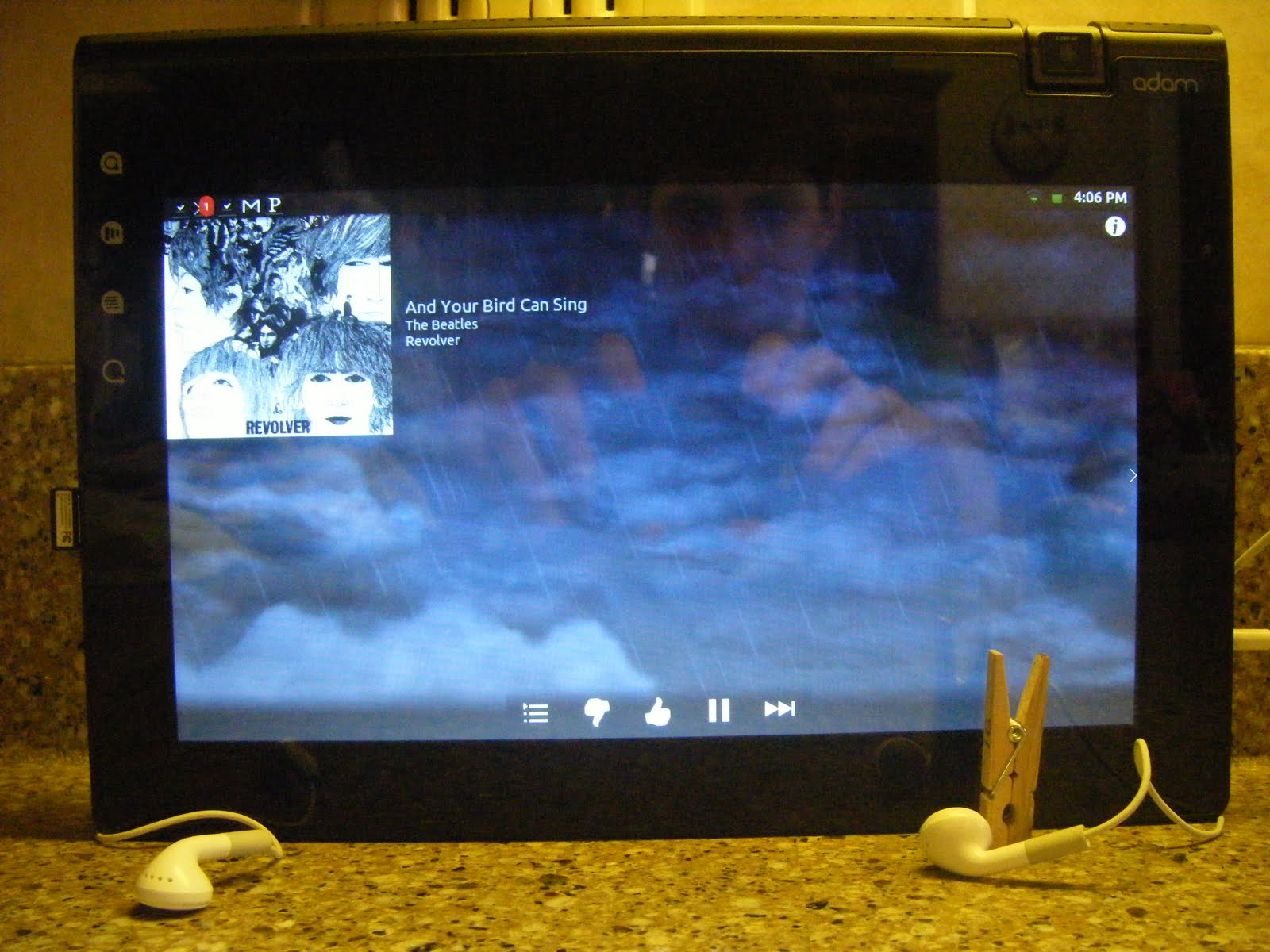
Notion Ink Adam Bug Report: Apple Headhones
Most people probably haven't noticed this and probably don't even care. The somewhat mediocre headphones that come bundled with iPhones, you know, the ones with the button for music controls? Well, they have a wierd side effect when paired with the Adam. The middle button has to be held down in order to hear music properly. Without the button being held, the music sounds garbled like a bad youtube video. This isn't a major issue by any stretch, but it is most likely hardware related. I don't know what causes the problem, but I do know a solution. A clothespin. Yes, a nice string clothespin to keep that button good and smashed.

Tuesday, April 12, 2011
VTL.Launcher Review - A Launcher For Tablets
Most Adam owners like their home screen replacement apps. Whether it be Launcher Pro, ADW, or Helix, we all have our favorites. VTL.Launcher is different in that it is made for the big screen. Currently in beta, VTL is strongly based off of ADW source code, and is designed for main use in landscape mode. While it does have the ability to go into portrait mode, it doesn't do it very well. Full thoughts after the break.

 A long press on an app brings up a little menu to remove, edit, get info, or show in Market. Unlike ADW there isn't an option to uninstall the app from this menu. Even though VTL is made for the large screen, the menu still fills the width of the screen just to give it an unfinished look. General scrolling speed throughout felt a little rough. It may be due to the beta tag, but it is fairly unpleasant considering the dual-core guts of the Adam. One downfall of VTL is the the poor transition it makes when in portrait mode. The widgets all look smashed. The dock on the bottom doesn't re-size, but rather the apps just get shoved off screen. I would like to see some more customization options such as home screen transition effects. Overall the experience is great and very well suited for the Adam. The Adam was made for landscape, so why not have a home screen to match.


The default configuration is having not one, but three docks all swallowing you into a window framed by apps. Also default is to have a shadowy black dock background. This configuration is not for the claustrophobic. Thankfully, you can change the docks around to suit you needs any way you prefer. I may never find a use for all of that dock space.
 A long press on an app brings up a little menu to remove, edit, get info, or show in Market. Unlike ADW there isn't an option to uninstall the app from this menu. Even though VTL is made for the large screen, the menu still fills the width of the screen just to give it an unfinished look. General scrolling speed throughout felt a little rough. It may be due to the beta tag, but it is fairly unpleasant considering the dual-core guts of the Adam. One downfall of VTL is the the poor transition it makes when in portrait mode. The widgets all look smashed. The dock on the bottom doesn't re-size, but rather the apps just get shoved off screen. I would like to see some more customization options such as home screen transition effects. Overall the experience is great and very well suited for the Adam. The Adam was made for landscape, so why not have a home screen to match.
The Wait For Honeycomb on Adam is Getting Ridiculous
Full faith was resting on Notion Ink to give us an update to Honeycomb for our Adams. After the Adam was released many speculated that Honeycomb may never see the light of day from behind a Pixel Qi screen. Rohan has assured us multiple times that Notion Ink will do everything in their power to bring us the fabled Android for tablets. Now it looks as if the issue may be out of their hands.
 Google has decided to hold off on releasing the source code because it wasn't made for use on phones. This is old news, and can be fixed if Notion Ink becomes best friends with Google. There is a very slim chance of this happening, but one can hope. Now it appears that Nvidia won't be supporting the Adam's Harmony based internals for future updates. This is only rumor, but it is very worrisome. Will the Adam ever get Honeycomb? The world may never know for sure.

Monday, April 11, 2011
Top Three Web Browser For Your Notion Ink Adam
The Eden Browser is one of the many sore points that hinders that overall experience. The zooming and scrolling are incredibly slow to use. There isn't an easy way to search. There are a lot of alternative browsers readily available on the Android Market, so what's the problem? They're all made for phones. Below I will give you a rundown of browsers that will suit your tablet browsing experience.
1. Opera Mobile 11
This gets the top of the list for the simple reason that it is designed for use on tablets. All the controls line the top to make everything in easy access. Flash works great. Tab switching looks nice, but it's a little slower than having your tabs always visible at the top. The settings, bookmarks, etc. all appear in a window instead of time wasting full screen. You have the option to hide the status bar if your prefer, but on Eden, the status bar is always hidden. This seems to mess with Opera making a white space appear above where the status bar should be.


2. Dolphin Browser HD
While it is still made for a phone, it has a set of features that make it awesome for use on tablets. The interface is fairly barren on visible controls. Without hitting the menu kay you only have home, URL bar, and tabs visible. The tabs are fantastic for the large screen. Instead of having always present navigation button like Opera, Dolphin Browser has them hidden under the menu button.
The Dolphin Browser has one feature that makes it perfectly suited for tablet use. You can change the user agent to have webpages view your device differently. As you can see in the picture below, the internet views the Adam as an iPad to make the webpages perfect for the screen size. Gmail's specialized iPad view is unlocked. Also available are the option to change the user agent to iPhone or default Android. Coming soon is the Dolphin Browser Pad that should combine custom user agents with a tablet suited UI.

3. Skyfire
The key selling point of Skyfire is the ability to convert flash videos to HTML5 for easy mobile view-ability. This feature is all together unnecessary since the Adam has flash. Converting to HTML5 may be beneficial if you want to conserve bandwidth (or so it tells me). The UI doen't look terrible on the big screen, but it doesn't look good either.
A lot of the buttons that are always visible are rarely used. The fifth button on the top is a quick switch for toggling between mobile and desktop view. While not as full-featured as the Dolphin Browser user agent equivalent, it is handier. Tab switching is another story. Hitting the tab switcher toggle brings up the tabs that blocks out the entire screen. Otherwise, the browsing experience isn't all that bad.

4. Firefox
Firefox deserves a mention because it is a very good browser... on phones. On a tablet screen it just doesn't work. It looks as good blown up as the stock android browser. One advantage you would have is the ability to sync bookmarks with the desktop version.
5. Wrap-up
What it all boils down to is the wait for Honeycomb on the Adam. Until the Eden browser improves or Honeycomb becomes available we'll just have to suffer or find alternatives.
 |
| Stock Android Browser (on Beast ROM) |
This gets the top of the list for the simple reason that it is designed for use on tablets. All the controls line the top to make everything in easy access. Flash works great. Tab switching looks nice, but it's a little slower than having your tabs always visible at the top. The settings, bookmarks, etc. all appear in a window instead of time wasting full screen. You have the option to hide the status bar if your prefer, but on Eden, the status bar is always hidden. This seems to mess with Opera making a white space appear above where the status bar should be.


2. Dolphin Browser HD
While it is still made for a phone, it has a set of features that make it awesome for use on tablets. The interface is fairly barren on visible controls. Without hitting the menu kay you only have home, URL bar, and tabs visible. The tabs are fantastic for the large screen. Instead of having always present navigation button like Opera, Dolphin Browser has them hidden under the menu button.
The Dolphin Browser has one feature that makes it perfectly suited for tablet use. You can change the user agent to have webpages view your device differently. As you can see in the picture below, the internet views the Adam as an iPad to make the webpages perfect for the screen size. Gmail's specialized iPad view is unlocked. Also available are the option to change the user agent to iPhone or default Android. Coming soon is the Dolphin Browser Pad that should combine custom user agents with a tablet suited UI.

3. Skyfire
The key selling point of Skyfire is the ability to convert flash videos to HTML5 for easy mobile view-ability. This feature is all together unnecessary since the Adam has flash. Converting to HTML5 may be beneficial if you want to conserve bandwidth (or so it tells me). The UI doen't look terrible on the big screen, but it doesn't look good either.
A lot of the buttons that are always visible are rarely used. The fifth button on the top is a quick switch for toggling between mobile and desktop view. While not as full-featured as the Dolphin Browser user agent equivalent, it is handier. Tab switching is another story. Hitting the tab switcher toggle brings up the tabs that blocks out the entire screen. Otherwise, the browsing experience isn't all that bad.

 |
| Skyfire Tab Switching |
Firefox deserves a mention because it is a very good browser... on phones. On a tablet screen it just doesn't work. It looks as good blown up as the stock android browser. One advantage you would have is the ability to sync bookmarks with the desktop version.
5. Wrap-up
What it all boils down to is the wait for Honeycomb on the Adam. Until the Eden browser improves or Honeycomb becomes available we'll just have to suffer or find alternatives.
Subscribe to:
Posts (Atom)