Showing posts with label Opinion. Show all posts

Sunday, June 5, 2011

The Question of Eden on Honeycomb (Reposted)


(An opinion of how the Adam's future should look written in February. With Honeycomb coming in less than a month, I thought it could serve as somewhat of a prediction and possibly a guide of what we want to see for the Notion Ink devs.)     
     In Rohan's latest blog post he made a quick statement saying that the Eden apps have been ported to Honeycomb. We all know that the Adam is eventually getting an update to Honeycomb. It may be weeks or months before Notion Ink finalizes the update for us. The Adam will be absolutely awesome with Honeycomb on it, but the question is how much of the Eden UI will be thrown on top of Honeycomb?
     As you can see in the picture above, vanilla Honeycomb even looks good on the Adam. There's no telling how far into the core the Eden UI will dig, but this is most likely not what the final product will end up looking like. Unlike previous versions of Android, it is very hard to put a custom UI over the top of Honeycomb without completely destroying it. This is a good thing, because I generally hate the custom skins they throw on top on Android.
   
     Way back in December Android Police had an interview with sir Rohan of Notion Ink. When asked if Eden would be preserved with Honeycomb, he said yes. In that same interview Rohan also said he would bring the Android Market with the Honeycomb update. (I'm still crossing my fingers in hope on the Market.) A lot has changed since December and Notion Ink's design team could have very well changed their minds on the Eden thing.

     Honeycomb could definitely benefit from the panels concept of multitasking (see this column). They have made Froyo into something that is truly tablet worthy. That required a lot of work and deep digging into the source code. The problem could be that Eden is built totally around a smartphone OS, and cannot be reworked too well with a tablet OS. In Eden they have replaced the normal multitasking interface with a panel switcher that is completely useless with the multitude of apps that do not have panels. In Honeycomb, the app switching has been moved to a soft button in the status bar area. What I'm saying is that some things simply can't get carried over to Honeycomb.

     Honeycomb is very widget heavy, and if Eden completely annihilates the home screen like they do in the current version, it could be a very low point of Eden. The home screen needs to stay. They could possibly throw a dedicated panel button in the navigation bar at the bottom to bring up the panel view. That brings e to my next point. Notion Ink has managed to add a hiding feature to the Froyo status bar so it will be out of site unless it is truly necessary. Rohan said that tablets shouldn't always have a status bar to take up screen real-estate. This idea is going to go out of the windows if they want a feasible Honeycomb design. The always there navigation bar is another high point in Honeycomb, and to get rid of it would just not work.

     Coming back to the panels idea now. If they added an extra button in the navigation bar to open the panels, it would be absolutely fantastic. I'm not saying that it should replace the recent apps button, but it would do nicely in the adjacent space. It would be there at all times to quickly start your multitasking duties. The best part about having a dedicated panels button is that the home screen will remain intact. I can't stress enough how important it is to keep the home screen intact.

     There is no doubt that Honeycomb can get better with a sprinkling of Eden on top, but a smattering would be all too much. Honeycomb needs little improving as it is, so too much wouldn't jive very well with a lot of people (me included). I suppose if Eden angers you too much you could always get a different tablet or a custom ROM. Let me know your thoughts in the comments below and the pool on the right.

Tuesday, May 24, 2011

Why I Kept My Adam

     The sound of crickets has been floating around here as of late. Everyone involved has gone silent. Many people have just up and left in the order of selling their Adams. I don't blame them. I'm getting tired of waiting for that fabled usability approving Gingerbread update too. That doesn't mean I'm going to sell my Adam to some unsuspecting patron. I have many good reasons to stay.
     The Adam is a great device when it comes to the hardware. The only things that bring it down are the thickness and the terrible screen. The camera could be considered a downfall as well, but I'll leave it be. The problem is in the software. It's terrible. Notion Ink hasn't update it to the (supposedly) more user friendly version yet. Many people have ditched the Adam because they got sick of waiting.
     
     I know the user experience can be good because mine runs Honeycomb. The alpha version isn't as smooth as I would like it to be, but it gives me hope. Hope that one day Google will release the source code on something to give power to the Adam. If I have to wait for Ice Cream Sandwich I will. I trust Notion Ink to give us the updates we deserve.

     Even if they completely ruin Honeycomb with the Eden overlay, I have ROMs to fall back on. Why do I still have my Adam? Software can be fixed. It was cheap. Tegra II. Trust in Notion Ink.

Thursday, April 28, 2011

Engadget Reviews Notion Ink Adam

     All I can say is finally! We (or I at least) have been waiting for a professional review of the Adam since it came out. Since all orders were shipped a while back, it's hard to tell what took them so long. They had some interesting things to say about the tablet. Most of them were bad, but they were also true. They main target of the negativity was, of course, the software and the screen. What else did they say? Read on.
     The Adam only did good enough to deserve a lousy 3 out of 10 rating from the big shots. The software was called upon repeatedly for being slow and buggy. They even went as far as calling it "beta at best". Not a goos sign. They seemed particularly proud of their discovery of a way to make the browser crash on command (multiple taps on the tab wheel). The panels got a nice little overview as to how they worked and such. A small item they touched on was the lack of responsiveness from the capacitive digitizer. It was blamed on the screen protector, but as I found out the screen protector has nothing to do with the lack of touch sensitivity, it is just another one of the tablet's quirks. Oddly, no mention was made about the low wifi signal.

     Engadget did have a couple of good thing to say about Notion Ink's baby. The ports... lots and lots of ports to fill your nerdy heart with joy. It use a "unique" design and an awesome sun-readable display. That was about it on the good side.

     Like everyone that has an Adam knows, the viewing angles are awful, the camera is funky at best, and the software is just bad out of the box. Engadget just reaffirmed what we already knew, but it's nice to hear from the pros. You know Notion Ink didn't do terribly great with their first product when Engadget calls it a prototype running beta software. Get the full review here: http://www.engadget.com/2011/04/27/notion-ink-adam-review/

Sunday, April 24, 2011

Silence is Golden - Gold Holds No Value in the Notion Ink Community

    It's been a long time since we last spoke. Does that sound familiar? It should. That is how Rohan started a few of his blog posts back when the official Notion Ink blog started to show signs of dying. Now he needs to start off every post with that little phrase. What has happened to the "family"? Where has the constant knowledge gone?

     The journey started way back in April (last year) when the blog was officially opened. The promise of the ultimate Android tablet kept people flocking. The teasing and constant flow of information kept the people coming back for more. The Adam would have been a beast if it were released last summer. No competition could match it on the specs. And then came the delays.

   Delay one with some investor issues. It was suppose to arrive sometime around Thanksgiving. In the weeks counting up to Thanksgiving we got post after post describing one bit of information at a time about the Adam. Weekend Specials he called them. It gave would be buyers a particular date to look forward to for more information. We knew everything about the Adam aside from a few crucial details.

     Would the Adam come with the Android Market? Nobody knew. It took an interview with Android Police to find out, and that was after the pre-order had started. Another piece of the puzzle that was completely missing was a demonstration of the actual device. We had screenshots, renders, photos, prototype photos, but no videos or photos of the actual production Adam. We were expected to buy out of trust, and many of us did.

     After the backlash of concern about a pre-order for an unknown product Rohan took charge of the situation by giving the videos we wanted. We didn't just get a video of the Adam doing its thing, we got a video demonstration every day. Now we knew everything about the Adam and how to use it once it arrived. This device still hadn't shipped to anyone.

     In January, the videos stopped because it was the time of year for CES 2011. That was a disappointment. Notion Ink didn't have a booth for whatever reason, and nobody knew they were their. Slashgear and Engadget seemed to be the only media folks that gave them any type of coverage. Maybe because they were looking for Rohan? From Engadget and Slashgear the Adam got excellent "reviews". Strangely, we have yet to receive an actual review on the Adam from either blog even though they said it was coming.

    CES marked the beginning of the end for Notion Ink's blogging record. Shipping delays and bricked Adam's destroyed the company's reputation overnight. Many people were angry; many people cancelled their order. Some people didn't even get an Adam until March. The customers that had their orders pushed backed several months didn't like silence on the blog very much either. Emails to support didn't bring back anything either.

     We know Rohan has something to blog about. The last post gave a hint of the next major software update for the Adam. Can't he give us a little teaser every weekend about the update like he's done before? Is he afraid of making promises he can't keep? Just put a little disclaimer at the bottom saying details may vary. We don't like being kept in the dark.

Saturday, April 2, 2011

Where Is Our Week-End Special From Rohan?

     It is 8:00 PM on Saturday, and I have yet to see anything from Notion Ink. This is just a simple blog post, but it is also one more promise not kept. This isn't good business. Sometimes, it's the small things that count. Now is one of those times. As far as I know, Rohan isn't in India at the moment. If you can't create a post don't keep silent.

Thursday, March 17, 2011

A Look Into The Shapes and Naming Schemes That Are Notion Ink

     If Notion Ink was trying to create a theme for themselves, they have done it. All over the tablet and in the UI you can find many things that are very "Adam". Why is nobody talking about these subtle details? Are they too subtle to merit a mention? I don't think so. Join me as I try to unravel the secrets inside the lines.
     That shape you see there is the defining shape of Eden. It appears all over the tablet, and into the UI. All of the buttons, the headphone jack, and the power jack have a logo with this shape. Even the name Adam is spelled with the letters in the shape. I suppose the real question is does it have any meaning? Probably not, but it is in way too many places to not have a purpose.

     The blue squiggly line in the picture was an attempt at showing another design aspect of the Eden UI. Some of the Eden app icons have the color filled in with a sketched look. It resembles the look of a crayon/brush stroke or maybe an unfinished sketch. The unfinished look would contribute to the unfinished fell of Eden. The entire Eden UI has a paper and sketch fell to it. Are they trying to say that Eden is a work of art, or was one of the designer an art school grad?

     Probably the biggest point to be made is the naming scheme. It's fairly obvious that the names are all biblical. Not everything is milk and honey in the garden of eden though. On the NotionInk.com landing page you will see a promotional video. The music player that is shown in the video is playing an interesting selection entitled "Eden - The Beginning". Hopefully, for Notion Ink, Eden is just the beginning. If they can make it past the Adam, Eden will have been the beginning and not the end. Adam is the first creation. Let's hope this doesn't mean Notion Ink considers themselves a god. One thing that is still a mystery is the company name. What in blue blazes is a Notion Ink? Could it be that Rohan had a notion? But then where does the ink come into play? What does it mean!

Friday, March 11, 2011

Why Does Everyone Seem To Hate Android? (Rant)

     Do you remember back to the days of the T-Mobile G1? The iPhone was still completely untouched in the market, and Android tried to stop its evil reign. While I wouldn't call its launch a failure, I wouldn't call it wildly successful either. Android brought the things people (nerds) truly wanted. It had an app store, multitasking, and openness. Android may have brought the goods, but it was ugly, slow, and downright complicated when compared to iPhone simplicity. Fast forward a few years and we have Honeycomb, but some bloggers still say the same things about Android.
     I was reading through Tech Crunch the other day when I came upon an article about why the iPad is still better than the XOOM. It was all about the software present in the XOOM. One reading it would think that Honeycomb is bunk, but it isn't. Honeycomb is far better than any previous version of Android ever was or will be. The author of the article was obviously a huge fan of Apple with very solid opinions. It seemed like he couldn't get past the sheer speed, elegance, and simplicity of iOS to notice any any downsides of his precious slate.

     Honeycomb has an awesome new UI that is simple while retaining the customizability that makes Android Android. The XOOM is lightning fast. The stuff in Honeycomb "they" were picking at were things like the occasional force close and slowing down if you are running too many apps. Those things are impossible to avoid unless you lock down the system and strip down a service until it only resembles its past. That is what Apple does. Multitasking isn't really multitasking on an iPad, and it is chained to the App Store.

     That isn't saying the iPad is a bad device. It's a magnificent device, but Honeycomb is also great and deserves the same amount of respect. Opinions are fine in the blogosphere, but you can't make these incredibly bias opinions and call it journalism.


Thursday, March 10, 2011

Hacking is Just Better on Android

     Until recently, I had never experienced the simple joy of rooting an Android device. Jailbreaking my iPhone was extremely easy with greenpois0n, so I thought I would give it a go on my Adam. Granted, jailbreaking and rooting are two different things, but the general idea is the same for both.
     The process of rooting the Adam was even easier than that of jailbreaking the iPhone. All I had to do was download a zip file, throw it onto the SD, reboot into recovery mode, and select the update.zip from the list. With those easy steps I had the Market, ad-hoc, and root access. They breathed new life into my Adam, and it got its usability back. The benefits of rooting are only have of the story.

     When I booted into recovery mode on the Adam it reminded me of something that I haven't done in a while. Back to the days of Ubuntu (which was actually more like a few weeks ago) I had to into the BIOS frequently to boot from that handy ole' live CD to get where I was going. The recovery mode gives me a peek into the system. I learn a little bit about how it all works, and what makes it tick. I actually have control over my device. I get none of that feeling of power with iOS.

     With the recent adventure of installing Honeycomb on a Nook Color, I was able to completely wipe the internal memory. That felt good. Sure it's all risky, but that is where the learning comes into play. I actually know what's going on. With greenpois0n, all I witnessed was the code streaming down the iPhone screen while I sat idle wait for it to finish. What does this all amount to? This is just another reason why I'll be ditching my iPhone, and also why I'll never buy an iPad.

Saturday, March 5, 2011

Eden Panels: A Review

     Good Ole' panels. They are the lifeblood and soul of the Eden UI. The Eden UI is what makes the Adam different from the slough of other tablets that were and are coming to the market. Eden is the attempt to bring a smartphone OS up to tablet standards while adding pizazz in the process, but do they work? Find out after the cut.
     On paper they looked fantastic, but in practice they leave something to be desired. It's a refreshing change to see somebody tackling real multitasking on a tablet. Having three apps open at once is great for the occasional need to do so. That is where the problem starts. I don't want to do this sort of multitasking very often, and Notion Ink thinks I should. The panels replace the home screen. You have the option to "lower" the panels to reveal what Notion Ink calls the normal Android home screen. It isn't. It's single screen list of apps that are aligned perfectly in a grid that is completely non-customizable. If you don't like where the app is placed on the screen, too bad.

     The actual use of the panels provides a different story. They are handy and nice to use. Having multiple apps open to scroll through saves quite a bit of time. Only NI has the apps that utilize the panel system to get the real multitasking action. They plan on releasing the Genesis store and SDK so developers can create "panelized" apps, but that won't likely happen until Honeycomb. The panel system is weird in it's current state too. Let's say you are browsing Notioninkfan.com in the browser panel, and you want to go full screen with the app. You can't. The menu button brings the option to launch the full application, but when you do it's like you are opening a completely different app. What happens in a panel, stays in a panel. Very little translates to the full app or vice-versa.

     Ironically, panels make normal multitasking a step harder. NI has gone to the unnecessary trouble of replacing the normal multitasking switcher with a panel switcher. Since there are very few apps that use panels, this is pointless. The alpha panel that holds the time, music, email, and facebook also holds the recent apps. This is an extra step, but at least they have addressed the issue.

     Time for a nit pick. Eden has an altered status bar that serves no real purpose other than because they can. They have the bar set up in a way that you can hide it by tapping on the battery in the corner. The natural state of the bar is to be hidden, which means that it blocks anything in it's way when it's open. The battery that resides in the corner for the hidden status bar can get in the way of some apps as well. When the Adam is booted the status bar is in the open position. Many new users have complained that the status bar is blocking everything because they don't know it has a hide feature.

     Panels are nice, but they have their quirks. It's all a matter of choice whether you like them or not. If you don't like them, you can always get a home screen replacer like Launcher Pro for free. There is no telling where panels will go when Honeycomb comes. For my thoughts on where they should go see here and here.

Hands-On with The Motorola XOOM

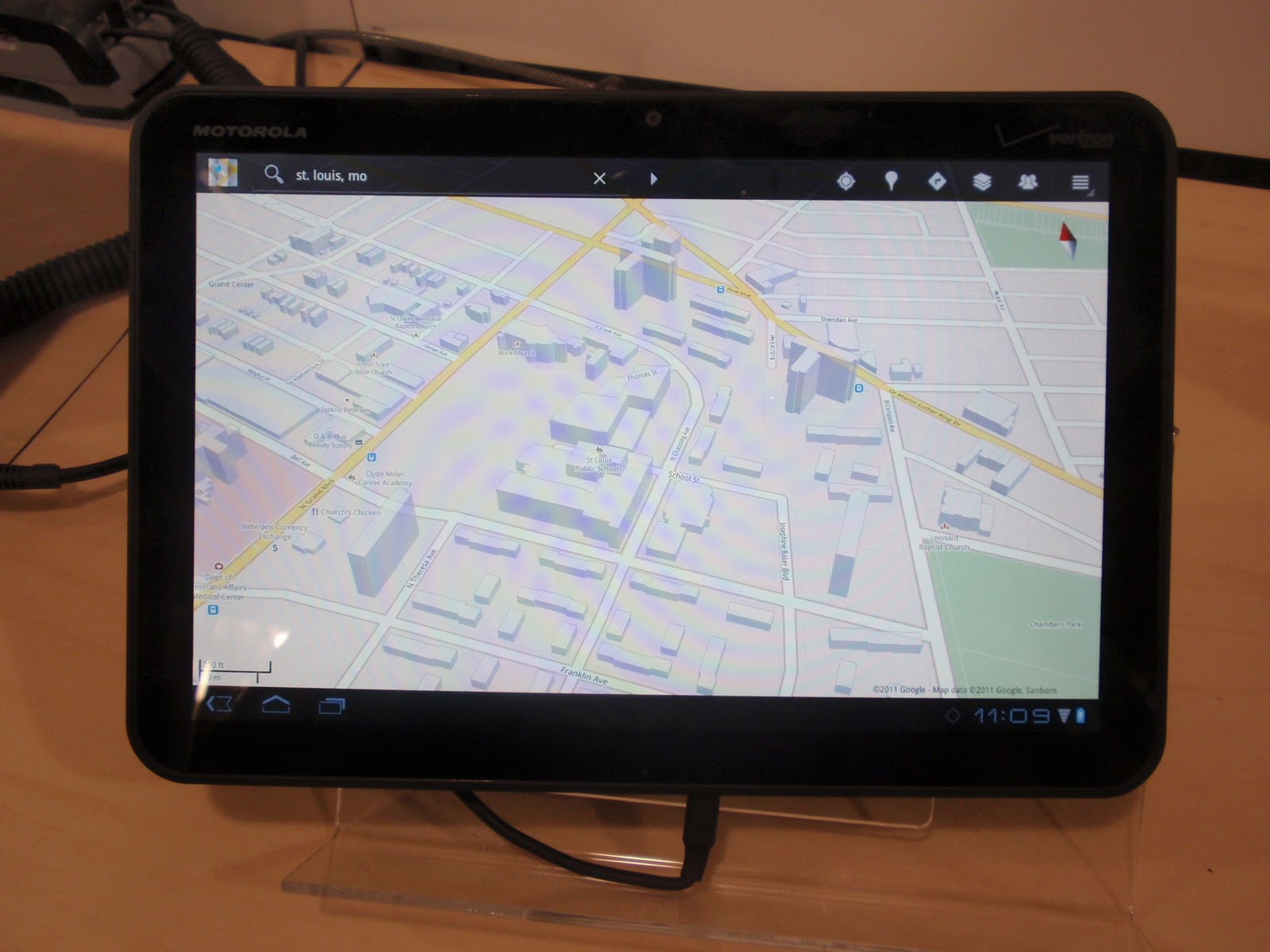
     All Apple products aside, many people think of the XOOM as the closest competitor to the Adam because of it's extremely similar specs, and it's Android powered surface. If you look past the competitive nature of things, the XOOM is more like Adam's brother. The XOOM is the sign of things to come on the Adam. The Adam will be running Honeycomb once Notion Ink gets it ready. A few minutes with the XOOM was my peek into my Adam's future.


     Honeycomb is gorgeous. This is what the Adam should and will be in the coming months. The first thing to point out is that the Honeycomb browser is miles ahead of the Eden browser. I like the Eden browser, but the tab switching is difficult and slow, it has a tendency to force close too often to be useful, and it isn't easy enough to just Google something. The full tabs are my favorite part of the 3.0 browser as well as the desktop-ish features to make it more useful in the long run. The XOOM doesn't have flash, but the video in the picture above played just fine. My best guess is that it's in HTML5, even though it says flash on my laptop.

     One of the biggest things the Adam can learn from the XOOM is the home screen; it actually has one. Panels are nice, but they should not replace the entire home screen. Widgets, multiple home screens, and easy app arranging are fundamental parts of Android that they simply through out the window. I sincerely hope they don't get rid of the home screen in Honeycomb with Eden.

     The XOOM felt really snappy in everything it did just like all of the reviewers said it would. The biggest take away from that was the fact that the XOOM has almost the same innards as it's Adam brother. The Adam is set on the hardware front, but it's the software that counts. The software on the Adam is miles behind in it's current state. It's buggy, unresponsive, and just not ready for prime time. The Adam also has the thumbs up on Eden apps and ports galore. If Honeycomb isn't ruined by Eden, the Adam will shine like the sun on a June day.

Thursday, March 3, 2011

The Question of Eden on Honeycomb

     In Rohan's latest blog post he made a quick statement saying that the Eden apps have been ported to Honeycomb. We all know that the Adam is eventually getting an update to Honeycomb. It may be weeks or months before Notion Ink finalizes the update for us. The Adam will be absolutely awesome with Honeycomb on it, but the question is how much of the Eden UI will be thrown on top of Honeycomb?
     As you can see in the picture above, vanilla Honeycomb even looks good on the Adam. There's no telling how far into the core the Eden UI will dig, but this is most likely not what the final product will end up looking like. Unlike previous versions of Android, it is very hard to put a custom UI over the top of Honeycomb without completely destroying it. This is a good thing, because I generally hate the custom skins they throw on top on Android.
   
     Way back in December Android Police had an interview with sir Rohan of Notion Ink. When asked if Eden would be preserved with Honeycomb, he said yes. In that same interview Rohan also said he would bring the Android Market with the Honeycomb update. (I'm still crossing my fingers in hope on the Market.) A lot has changed since December and Notion Ink's design team could have very well chnged their minds on the Eden thing.

     Honeycomb could definitely benefit from the panels concept of multitasking (see this column). They have made Froyo into something that is truly tablet worthy. That required a lot of work and deep digging into the source code. The problem could be that Eden is built totally around a smartphone OS, and cannot be reworked too well with a tablet OS. In Eden they have replaced the normal multitasking interface with a panel switcher that is completely useless with the multitude of apps that do not have panels. In Honeycomb, the app switching has been moved to a soft button in the status bar area. What I'm saying is that some things simply can't get carried over to Honeycomb.

     Honeycomb is very widget heavy, and if Eden completely annihilates the home screen like they do in the current version, it could be a very low point of Eden. The home screen needs to stay. They could possibly throw a dedicated panel button in the navigation bar at the bottom to bring up the panel view. That brings e to my next point. Notion Ink has managed to add a hiding feature to the Froyo status bar so it will be out of site unless it is truly necessary. Rohan said that tablets shouldn't always have a status bar to take up screen real-estate. This idea is going to go out of the windows if they want a feasible Honeycomb design. The always there navigation bar is another high point in Honeycomb, and to get rid of it would just not work.

     Coming back to the panels idea now. If they added an extra button in the navigation bar to open the panels, it would be absolutely fantastic. I'm not saying that it should replace the recent apps button, but it would do nicely in the adjacent space. It would be there at all times to quickly start your multitasking duties. The best part about having a dedicated panels button is that the home screen will remain intact. I can't stress enough how important it is to keep the home screen intact.

     There is no doubt that Honeycomb can get better with a sprinkling of Eden on top, but a smattering would be all too much. Honeycomb needs little improving as it is, so too much wouldn't jive very well with a lot of people (me included). I suppose if Eden angers you too much you could always get a different tablet or a custom ROM. Let me know your thoughts in the comments below and the pool on the right.

Friday, February 25, 2011

Adam Initial Impressions... The Good Side of the Story

     Yesterday I told you about most of the bad things I have noticed so far, and now it's time to point out the good before somebody picks up the bad to use against Notion Ink.
     The apps that Notion Ink has designed are quite fantastic. Two of my favorites are Mail'd and Sniffer. They really utilize the panel system to its full extent. They don't use the back button like other Android apps would. Instead, they use backwards swipes to navigate back to the point of origin. The Calendar app should also be mentioned as one of the stand out apps. Three apps that have yet to arrive are the amazing looking weather app, the specialized music app (it currently has the stock Android music app), and the Genesis store.

     I thought that the panel system would come in handy, but ti hasn't for me. I usually find myself reaching for the menu button to launch the full app. I can see where it be of use, but it just hasn't found its way into my needs yet. The "alpha panel" is extremely useful. It is the center for music, mail, facebook (oddly), and the recent apps. A tap on the top of the Alpha panel brings the panels down to reveal a list of apps that, sadly, aren't rearrangeable. The panel system is nice, but apps have to be written for the Adam to utilize the panel system. I have already written what I want to see from the panels here.
   
     One of the most useful parts of the tablet is the inclusion of USB ports and sniffer. I have control of what is on my tablet. I have used a flash drive several times to transfer apk's and songs. This is one thing that the Adam has that is above all other tablets on the market right now. Right along with the USB ports is the full HDMI port on the side. Angry Birds never looked so good. The Adam will be in awesome standing if they can just fix the software problems I discussed here.

Thursday, February 24, 2011

Adam Initial Impressions

     I have had my Adam for a day now and what do I think about it? It's a mixture of good and bad so far. Be warned though, because this post will consist mostly of the bad. Read after the break for Impressions.
     I'll start off on a good not by discussing the hardware. It is fantastic. I may not be as svelte as an iPad, but it is still great in the hands. That curve combined with the large amount of bezel creates an amazing grip. The back button on the side serves little purpose for me. I think the power switch would be better if it has an actual button instead of the slide switch that it is. The camera is a tad wobbly, and I can guarantee that it only swivels 180 degrees. I can get 185 degrees out of it by shoving it down, but it locks at 180. The silk screen on the back has a typo directly under where it says,"Created with love by Notion Ink Design Labs". The mistake reads,"This may device must accept any interference received...". The hardware buttons definitely need to have a backlight. I don't know what's wrong with the wifi radio. It has terrible signal strength. I mean TERRIBLE.

     On to the software. It needs work. I don't mean work like pulling an all-nighter at the office; I mean work like building a house in a week with only two people. I may be exaggerating a little, but the software does need some serious tweaking. I like the Eden UI, but the experience is suffering. With its Tegra guts, it should be capable of buttery smooth animations and seemless transitions. I liken the speed right now to that of the original Motorola Droid (You know. The one with a 500mhz processor.). Angry Birds ran like butter, so it has to be the UI that holds the slow problem. I like the hidden notification bar if I can get it open. I have to tap on that little battery in the corner several times to get the dumb thing open. I can't believe how unresponsive it is, and the launcher is the same way but not quite as bad.

   I would put up with all of that and give it a stellar rating if it weren't for the biggest problem with the device. It doesn't have the Android Market. I didn't think it was going to be that big of a problem, but having to side load all of your apps only to find out that have of them won't install, crash, etc. is the biggest pain of the entire device. Rohan said in an interview back in December that the Honeycomb update would also bring the Market to the device. I hope he hasn't changed his mind. Genesis is a good idea, but the user base is way too small to have a good quantity of apps. I haven't found an apk of flash that works yet. So far, they have all caused the browser to crash.

    You may ask if I hate my Adam. The answer is no, because I love my Adam and I have faith in Notion Ink. Faith is what got me to this point. I have confidence that they will bring out software updates that with fix these problems (the terrible wifi signal strength worries me due to the fact that it is a hardware problem) and eventually update it to Honeycomb with the market. In case you are wondering, I have the LCD + WiFi variant. If you are thinking about ordering one I am going to say go for it!


Monday, February 21, 2011

Honeycomb Has Changed my Opinion of Custom UI's

     A little more than a year ago the greatly rumored Google phone was announced, and everyone thought it was fantastic. It has since set the standard for hardware. The appeal in the Nexus One for me was only partly the hardware; the software had the most amount of pull. It packed stock eclair without any of that skinned garbage. Custom UI weren't as commonplace then as they were now which is not the way I want things going. The UI's they put on phones are sometimes beneficial, but they usually cause problems like Samsung's Touchwiz. And then came Honeycomb....
     Honeycomb has this awesome new user interface that is almost impossible and unreasonable to skin. HTC is convinced to put Sense on the Flyer for it to get Honeycomb. Notion Ink is going to deck out Honeycomb with their Eden UI. What we have at this point in time are a ton of tablets that all run stock Honeycomb. They have very little differences other than a few hardware specs. It's a massive see of sameness. Is that what it would be like if all android phones ran stock builds? Probably.

     Manufacturers have every right to meddle with the source code to their own pleasing. They need a way to distinguish themselves from the crowd. Often times, this is the only reason they have their own skin. Is there any other reason for Touchwiz's existence? I still hate custom UI's, but I see there purpose for the people making them. Without them we would have many different bodies floating around with the same face.

Thursday, February 17, 2011

We Need Google Music

     It's a simple fact. We don't just need Google Music to have some type of iTunes competitor, but to give android some multimedia capabilities that aren't terrible. Since it is from Google, it will probably have some variety of streaming capabilities with it. No more filling up your SD card with your giant music library. This could be less convenient if you have a slow or no internet, but that is a discussion for a later day.

Saturday, February 12, 2011

Smartphones and The Elderly

    How do we live without our smartphones? They are there to help us do everyday things, and they are always with us. In general, we are a little too dependent on them. The majority of the nation isn't quite so lucky to have the gift of a pocket elf to tell them when to take the next step. No, the majority of the nation has a feature or, dare I say, dumb phone.
       Over the years, smart phones have become so easy to use that a small child knows how to flick through those photos without wincing. The iPhone may be the epitome of ease of handling. Your average flip phone, on the other hand, is generally a completely different story. Even the most technically minded of us have trouble from time to time on these simple creatures.

     So then I ask you this: Why do the elderly and completely computer illiterate have such hard to use devices.You may think that is a stupid question, but it really isn't. I'm sure you've been asked how to get to that silly, hidden voice-mail before. All you have to do is place those frequently visited apps right on the home screen so they know exactly where to look for them. Assuming they just use their phone for the basics, all of the apps will fit on one screen.

      A lot of that phone's potential is being wasted by doing this so they can get away with a super budget phone so long as it's easily customized and easy to use. You could get them the iPhone 3Gs or and LG Optimus for under $50. You will most likely be forced to have a data plan, so opt for the smallest amount of data possible and set up some type of service they could use (such as weather or email) so they aren't throwing away the money on data. This plan obviously isn't for everyone, but if you can set up and show them how to use the phone, this could be a viable option. They might get to exploring, and learn how to use it a little more towards its potential.

Tuesday, February 8, 2011

The Direction Eden Panels Need To Go (Notion Ink Adam)

     If you don't know what a Notion Ink Adam is, please head over to my explainer page here. Panels are the magic of Eden. They are the basis of the entire UI. They are designed to give you a portion of an app to view next to two other panels. Part of the panel design is to not give full functionality to these panels to save resources and battery. This is a good system, but there are so many places Notion Ink could go with it.
     Android recently had an event to detail their new honeycomb (Android 3.0) OS update. While you probably already know about it, I'll explain it anyway. Honeycomb is built for tablets. Google detailed app fragments to make app that have extra menus and screens when on a bigger screen, but lose the extras for a regular smartphone. Unlike the iPad, an android app can now have one version for both phone and tablet. In his most recent blog post Rohan stated the "Fragments is what panels are".

     We all know that the Adam needs the market. The reason that it doesn't have the market now is because they are all phone apps that look stupid on a huge screen. Why shouldn't we be able to run these phone apps in a panel to avoid blowing it to outlandish proportions? This won't work with all apps (like landscape apps), and it would tax the resources a little harder. For the apps that won't work in panels it doesn't hurt the enlarge an app every once-in-a-while. As for the added pressure on the processor... well I don't have a plan for that.

     Smartphone apps in panels is slightly less of a good idea in froyo as compared to honeycomb. Honeycomb brings app fragments into play for excellent panel integration. You could have the full tablet mode of the app in full screen, and have the slightly stripped phone rendition of the app in the panel. This may have been what Rohan meant when he made is statement about fragments, but it doesn't seem likely. When Notion Ink pushes out the honeycomb update for the Adam the market is coming with it, and the market will come with a plethora of smartphone apps. Notion Ink, please put panels to good use.

Monday, February 7, 2011

The Mac App Store - A Good Idea or The Beginning of The End?

    It is old news by now that the Mac App Store was released at the beginning of the year. It is a good idea to have several nice pieces of software available in one place for you to browse at your own free will. Ubuntu has been doing it for years, and Microsoft will probably have one of their own when Windows 8 comes rolling around. What worries me is the chance of  Apple trying to iOS-ify their Mac Store.
     Apple has a bad rap when it comes to the iOS app store being locked down. They control it with an iron fist. One of the main resons I like Android is because they don't lock down the phone to only what they want you to have. Right now a mac can get an app wherever the user pleases. If this changes, I will never buy a mac. If I have to get a mac app from the mac app store than Apple has gone too far. 
   
    A Mac is a full-size computer, and you should be able to to what you want with it. Anything else should be against the law. A lock-down is only a little bit more excusable on a smartphone. The Mac App Store is restricted to its iOS counterpart's standards, but I have other choices. The internet is at my disposal. Should Apple make the Mac App Store the only choice for apps... they will have committed suicide.

Saturday, February 5, 2011

A Small Chrome Dev Feature That Deserves Praise

    Chrome has many features that just driving up its user base. Many of the features like raw speed and cunning good looks attract people (like me) to start using it, but the many small features it hides keep us coming back for more. Chrome has released a new feature (in the developer/beta version) a few months back that I have found be very useful.
    The awesome feature is called click to play. All it does is stop a plug-in like flash from loading until you click on it. It has made me realize how ubiquitous flash is on the internet as well as many useful features. Before using the experiment flash would run in the background and hog 20% of my CPU even at idle. With plug-ins blocked my pages load faster and my laptop doesn't burn a hole in my leg. 
    
    As I mentioned before, this is only available on the dev/beta channels of Chrome. It isn't just a simple setting either. You'll find it, along with other Google Labs, in the about:flags tab. After that you just enable it and head over into setting to set the plug-ins to click to play.
     

Friday, February 4, 2011

The iPad Is Starting To Show Its Age

     What a magical and revolutionary device it has been. It has carved a new market for others to follow, and ultimately paved the way for the future of the tablet. The one thing we must remember about it and Apple in general is that it is approaching its first birthday. That means that it's about time for the iPad 2. We can expect it sometime around April, but what does it need to feature?
    With the slew of awesome tablets at CES 2011 the iPad needs to tremendously up its game in order to compete with the big names. First of all, I would like to see a nice boost in the processor to something similar in the dual-core family. Along with the processor the RAM needs to get a kick up to around 1GB. This would make flash purr like a kitten, but Apple and Adobe don't mix.

    A feature the iPad has been soarly lacking from day one is that camera. Nearly all of today's tablets have a front and rear camera. I can't even think of tablet that is lacking in this area. It's time to bring the iPad into some of that facetime action. The camera would probably be on par with that of the iPod Touch meaning HD video, but terrible still photos. Who would replace a point-and-shoot with a clumsy iPad anyway?

    With the recent debut of multitasking gestures in iOS 4.3 beta it seems to me that the next-gen iPad could be ditching the home button for less orientation confusion. The software still needs a bit of tweaking to optiize it for the giant screen, but Apple is likely to drag its giant feet with this one. While we're dreaming, it would also be nice to see some type of removable storage. Apple, it's time to stand up to Honeycomb.