Showing posts with label Tablets. Show all posts

Monday, April 11, 2011

Top Three Web Browser For Your Notion Ink Adam

     The Eden Browser is one of the many sore points that hinders that overall experience. The zooming and scrolling are incredibly slow to use. There isn't an easy way to search. There are a lot of alternative browsers readily available on the Android Market, so what's the problem? They're all made for phones. Below I will give you a rundown of browsers that will suit your tablet browsing experience.
Stock Android Browser (on Beast ROM)
 1. Opera Mobile 11
      This gets the top of the list for the simple reason that it is designed for use on tablets. All the controls line the top  to make everything in easy access. Flash works great. Tab switching looks nice, but it's a little slower than having your tabs always visible at the top. The settings, bookmarks, etc. all appear in a window instead of time wasting full screen. You have the option to hide the status bar if your prefer, but on Eden, the status bar is always hidden. This seems to mess with Opera making a white space appear above where the status bar should be.


2. Dolphin Browser HD
     While it is still made for a phone, it has a set of features that make it awesome for use on tablets. The interface is fairly barren on visible controls. Without hitting the menu kay you only have home, URL bar, and tabs visible. The tabs are fantastic for the large screen. Instead of having always present navigation button like Opera, Dolphin Browser has them hidden under the menu button.

     The Dolphin Browser has one feature that makes it perfectly suited for tablet use. You can change the user agent to have webpages view your device differently. As you can see in the picture below, the internet views the Adam as an iPad to make the webpages perfect for the screen size. Gmail's specialized iPad view is unlocked. Also available are the option to change the user agent to iPhone or default Android. Coming soon is the Dolphin Browser Pad that should combine custom user agents with a tablet suited UI.

3. Skyfire
     The key selling point of Skyfire is the ability to convert flash videos to HTML5 for easy mobile view-ability. This feature is all together unnecessary since the Adam has flash. Converting to HTML5 may be beneficial if you want to conserve bandwidth (or so it tells me). The UI doen't look terrible on the big screen, but it doesn't look good either.

     A lot of the buttons that are always visible are rarely used. The fifth button on the top is a quick switch for toggling between mobile and desktop view. While not as full-featured as the Dolphin Browser user agent equivalent, it is handier. Tab switching is another story. Hitting the tab switcher toggle brings up the tabs that blocks out the entire screen. Otherwise, the browsing experience isn't all that bad.
Skyfire Tab Switching
4. Firefox
     Firefox deserves a mention because it is a very good browser... on phones. On a tablet screen it just doesn't work. It looks as good blown up as the stock android browser. One advantage you would have is the ability to sync bookmarks with the desktop version.

5. Wrap-up
     What it all boils down to is the wait for Honeycomb on the Adam. Until the Eden browser improves or Honeycomb becomes available we'll just have to suffer or find alternatives.

Tuesday, March 22, 2011

Galaxy Tab 8.9 & 10.1 First Impressions (Adam Beware)(Video)

     It looks like we have a couple of worthy adversaries to add to the list today. They are the most iPad like Android tablets I have seen thus far. The Galaxy Tab's are to be sold based on the amount of memory with a 16 and 32 GB variant. The big story from here is that they will both be wifi only at launch. The prices are as follows:
16 GB 32 GB
Galaxy Tab 8.9 WiFi $469 $569
Galaxy Tab 10.1 WiFi $499 $599     
     The 8.9 Tab will have an interesting accessory that causes worry in the Adam realm. It has USB in/out. The one thing the Adam excels at, and they made it available on a Samsung device, but you still has to buy the dock connector add-on to use it. The insides are the usual dual-core 1GHz chip and 1GB RAM that we have come to expect by now. The rear cameras are both 3MP while the front shooters are rated at 2MP. Both have the usual front-facing cameras. Another feature that has potential to shoot the Adam down are the stereo surround sound speakers that the tablets have. They must be good for Samsung to boast like they do. The Galaxy Tab's are also the world's thinnest tablets, coming in at 8.6mm in thickness (just 0.2mm thinner than the iPad).

     The story isn't just about the hardware this time around. Samsung, most likely in an effort to differentiate themselves, have skinned Honeycomb over with Touchwiz 4.0. It may not be all bad news, however, as it seems that Sammy has tried to do a little more than replace the launcher this time. Touchwiz replaces the home screen with what they call "Live Panels". In the demo below you can see that you can actually open up certain apps in little windows. Windows on an Android-powered tablet is refreshing to say the least. Tablets might be getting some desktop savvy to them. The video is courtesy of Android Community.


Friday, March 4, 2011

The One Killer Feature of the iPad That Has Left Me Envious

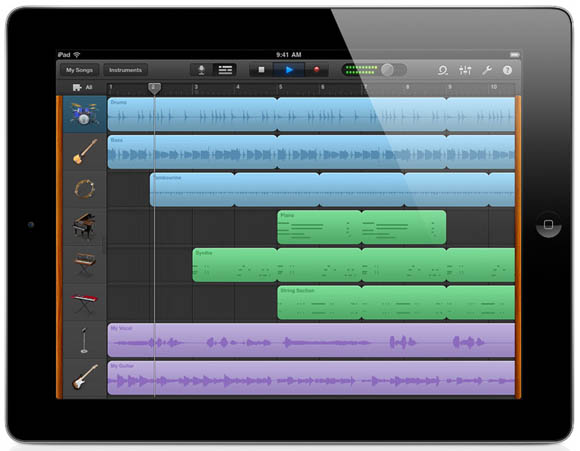
I don't deny that the iPad is a great device. Everything Apple makes is an overall great product. The reason I went for Adam was Apple's locked down world of apps from nowhere other than the App Store. I want the freedom to do what I want with my device without shooting a hole in my warranty, but that is a discussion for a later time. I am hear to talk about the (in my mind) coolest feature of the iPad, GarageBand.
      Out of all of the hardware, iOS usability, paper-thin design, and Face Time all I want is GarageBand. It is just an app, but it is only available on the iPad. It has the perfect combo of fun and useful. Songs would be easier create than ever before. I could start a garage band. I have yet to find any app, on Android or iOS, that delivers this kind of musical ability. I will provide you with a review in the future specifically on GarageBand for iPad. Coming also in the future are iPad and Adam comparisons, iPad review, and other tablet related goodness.

Wednesday, March 2, 2011

iPad 2 vs. Adam

     Here is the day we've been waiting for. The iPad finally gets a successor to compete with the new generation of Android tablets that are bursting onto the scene. The new iPad has cameras, a dual-core processor, and more, but how does it compare to the Adam?
     The new dual-core should match up to the Adam's fairly well. The screen on the iPad hasn't changed, but it is still better. The cameras on the iPad are still somewhat of a mystery. The front facing camera shoots video at a low VGA resolution, while the back camera shoots video at 720p. Apple said nothing about the resolution of the still shots other than the 5x digital zoom on the back. My guess is that, just like the iPod Touch, the resolution is so low they are ashamed of it. The Adam's camera is theoretically better at 3.2mp, but the still are pretty grainy. I think it is safe to say the the cameras are mediocre on both tablets, but the iPad's doesn't swivel.

     Another mystery represented to us today was the lack of information about the RAM. The first gen iPad has 256MB of it, and it reported that the iPad 2 is either the same or double. Any way you slice it, the Adam has more RAM at 1GB. That may not matter when you consider the frugality of  iOS.

     Somehow, the iPad managed to pack everything into a shell that is only 8.xmm thick. The iPad flatout wins in the size department, but the curve on the Adam is still a nice grip. The speaker of the iPad has moved to the back of the device. The Adam's speaker is practically unbeatable with its superb sound and stereo arrangement.

    The differences in the OS's is completely a matter of opinion. It being an opinion, I will let you decide which one is better. The software is what truly defines a tablet, and Eden will get better with time. One thing the iPad has over the Adam is popularity. Apple has the ability to produce that Notion Ink will likely never have.  

Wednesday, February 23, 2011

My Adam is Here!

     It came at about 5 PM. Until I get some first thoughts up, here are the unboxing photos. The box converts to a stand. It came with a nice travel adapter for those overseas.


Monday, February 21, 2011

Honeycomb Has Changed my Opinion of Custom UI's

     A little more than a year ago the greatly rumored Google phone was announced, and everyone thought it was fantastic. It has since set the standard for hardware. The appeal in the Nexus One for me was only partly the hardware; the software had the most amount of pull. It packed stock eclair without any of that skinned garbage. Custom UI weren't as commonplace then as they were now which is not the way I want things going. The UI's they put on phones are sometimes beneficial, but they usually cause problems like Samsung's Touchwiz. And then came Honeycomb....
     Honeycomb has this awesome new user interface that is almost impossible and unreasonable to skin. HTC is convinced to put Sense on the Flyer for it to get Honeycomb. Notion Ink is going to deck out Honeycomb with their Eden UI. What we have at this point in time are a ton of tablets that all run stock Honeycomb. They have very little differences other than a few hardware specs. It's a massive see of sameness. Is that what it would be like if all android phones ran stock builds? Probably.

     Manufacturers have every right to meddle with the source code to their own pleasing. They need a way to distinguish themselves from the crowd. Often times, this is the only reason they have their own skin. Is there any other reason for Touchwiz's existence? I still hate custom UI's, but I see there purpose for the people making them. Without them we would have many different bodies floating around with the same face.

Saturday, February 19, 2011

HTC Flyer Impressions

     HTC had a hay day at MWC with the release of six new devices. One of those devices was HTC's first tablet that has been rumored for several months now. At first glance it looks like a giant HTC Sense-skinned phone, but it holds more secrets than meets the eye. It has quickly become my favorite 7" tablet so far.
     The Flyer is a powerhouse that packs 2.4 Gingerbread and a 1.5Ghz processor. The tablet also has a 5MP camera on the back with a VGA camera on the front. Immediately the device seemed outdated because it doesn't run Honeycomb, but HTC has stated that it will get an update when they formulate a way to skin it with Sense. At launch it will run a tablet specific version of Sense. The HTC Flyer looks like a great, small tablet that will only get better with Honeycomb.

Update: The killer feature on this tablet that I forgot to mention is the stylus. It has a stylus that you can use with the usual multi-touch screen. The software side of the stylus is called HTC Scribe.

Tuesday, February 15, 2011

Recap on Devices Released By HTC at MWC

     Here we are on the third day of mobile world congress. I would normally summarize the new devices, but Slashgear put together a nice article to do it for me, so here it is. All credit goes to Slashgear.com. You may notic several mentions on 2.4 Gingerbread. I haven't heard any official word on the differences, so if you you know the difference between 2.3 and 2.4 please comment below.
Slashgear:

We had quite a rush of HTC news live from MWC 2011 this morning, so here’s a recap in case you didn’t catch everything. Our very own Chris Davies got plenty of hands-on time with the new product line up from HTC including the Incredible S, Wildfire S, Desire S, Chacha, and Salsa smartphones, as well as the Flyer tablet. Other HTC announcements included an updated version of their HTC Sense, a new videochat app, new support for OnLive cloud gaming service, and their partnership with Qualcomm to develop multi-core devices.
The HTC Incredible S, is perhaps their least appealing device with an” inside-out” industrial style. Performance and features are similar to the previous Incredible , but notable differences include an added front-facing webcam that supports HTC’s new video call app as well as Mirror app. And the device now is GSM compatible. Check here for hands-on video and images.
The HTC Wildfire S is the company’s cheapest phone but the new model seems to be a huge improvement over its predecessor. It has found its own identity now sporting a more angular chassis and also stepped up to an HVGA display from its original QVGA display. However, it lacks a front-facing webcam and therefore cannot utilize HTC’s new video call app. Check here for hands-on details and images.
The HTC Desire S is their bestselling smartphone and has a chassis milled from a single piece of aluminum. The new model’s responsiveness is similar to its predecessor, the Desire, as it still uses 1GHz single-core Snapdragon, but now has added a front-facing webcam that supports the HTC’s new video call app and Mirror app. The production model will be running Android 2.4 Gingerbread. Check here for a hands-on video and images.
The HTC ChaCha and Salsa are the two new smartphones that deeply integrate with Facebook. Of the two, the ChaCha has the better hardware. The Salsa has the bigger screen but feels like a lesser build. It’s difficult to judge the software at this point because the demo units did not seem to have final software loaded. However, they did demonstrate that the integrated Facebook buttons light up when viewing something on screen that can be shared online. Actual production units with final software won’t be available until Q2 2011. Check here for hands-on video and images.
The HTC Flyer tablet introduces the use of stylus in addition to multi-touch with more focus on note-taking and content creation. The 7-inch tablet has a slick aluminum unibody with a matte-finish plastic. The build feels more solid than the Galaxy Tab, and also feels easier to hold. The Flyer features a newly updated HTC Sense on top of Android 2.4 Gingerbread resulting in an enhanced user interface. Check here for hands-on video and images.
Other announcements:
HTC announced that they intend to partner with Qualcomm to develop multi-core devices. However, no timeline or any specifics were presented on upcoming multi-core plans.
The HTC Video Chat app made for Android was demoed as loaded on the HTC Desire S and the HTC Incredible S. The app can be used with the front-facing VGA webcams on the HTC smartphones or on the 1.3MP camera on the HTC Flyer tablet. The app features a simple interface but it is unclear for now whether it is limited to devices within its own ecosystem like how Apple limits Face Time to its own devices, or if there is more flexibility.
HTC also demonstrated their new integration with OnLive cloud gaming on the HTC Flyer.
And, an updated version of the HTC Sense was announced that supports portrait and landscape orientations as well as high-resolution displays like the 1024×600 display of the HTC Flyer.

Monday, February 14, 2011

MWC's Stand-Outs Today

     There have been a slew of devices launched, detailed, and handled today. There is no possible way I could give you all of the details on all of them, so I will just name a few stand-out devices for now. Some push the limit while some just make you ask why.
     LG's entrants may be the devices that ask the question of "why?". The Optimus 3D is a super phone with dual memory and dual-core. It has a super large, but seemingly ubiquitous 4.3" screen with a special feature that adds a little appeal to it. The screen is stereoscopic which allows you to watch 3D without glasses. To get that 3D content it has dual 8MP, 1080p cameras on the back along with a single 2MP shooter on the front. The 7" Optimus Pad (G-Slate in America) also has dual cameras for 3D, but they are only 720p and the screen requires passive glasses to view 3D. The Pad will run Honeycomb and have a Tegra II processor.
    
     Acer has a new entry into the smart phone market that really pushes the limit as to what it will be called. The screen is a whopping 4.8". This thing reaks of Dell Streak, but the bezel seems to be a lot smaller than on other devices, presumably to maximize the portability. Another weird feature it has is the 2MP camera on the back and 8MP on the front. I certainly hope that was a mistake because that just seems stupid to put the goos camera on the front.It is still out for debate in whether it should be considered a tablet.

     The last device I will touch base on today is the Galaxy S WiFi 4.0 and 5.0. Imagine a Galaxy S without any type of cell service and a five inch screen-ed variant. It's about time somebody other than Archos hit on the iPod Touch market.
      

Sunday, February 13, 2011

MWC New Devices On Day One

     The new phones and tablet s are as follows (I may miss one or two):
-Sony Ericsson Xperia Neo
-Sony Ericsson Xperia Play
-Sony Ericsson Xperia Pro
-Samsung Galaxy SII
-Samsung Galaxy Tab 10.1
Yes, it's a stampede of "S" brands and uncreative names. Details after the break.
     All of the Xperia's have the same snapdragon processor, 3.7" display, and some variation of Gingerbread (I keep seeing 2.4 listed in the specs as opposed to 2.3).The Neo is the candy bar, while the Play has a thumb pad for gaming and the Pro has a full keyboard. The Neo and Pro have an 8mp camera, and the Play has a 5mp shooter. At this time I'm not sure about these or any other details.
    
     The Galaxt SII is a worthy successor to the original Galaxy S. For cameras, it has an 8mp on the back that's capable of full HD video, and a 2mp on the front for video chat. It has Android 2.3 with Touchwiz 4.0 to power the on board NFC sensor. Like the Tab 10.1 it is powered by a 1Ghz dual-core processor. The new Tab has specs similar to the Xoom with Honeycomb and all. Stay tuned for more news from Mobile World Congress.

Wednesday, February 9, 2011

HP Announces New Web OS Line-Up

    HP bought Palm, but the only thing about Palm that's dead is the Palm branding. Today saw the unveil of three new Web OS devices; the HP Veer, HP Touchpad, and the HP Pre3. The HP Veer and Pre3 are the new smartphone entries, while the Touchpad is the much anticipated tablet. Specs after the break.
     Let's start with the HP Veer. The Veer is one of the tiniest smartphones available with a 2.6" screen and full portrait Qwerty. WebOS 2.2 runs its tiny heart which is also powered by an 800mhz processor. Hp said that it's aimed at bridging the gap between feature phone and smartphone. It has a nice amount of 8GB of storage, a 5 MP camera, and that speedy HSPA+ that everyone's been talking about.

     The next entrant is the Pre3. It's obviously a successor to the Pre and Pre2. Powering its WebOS 2.2 is a beastly 1.4Ghz processor. The screen got a boost to 3.6" and a resolution of 800x480. Like the Veer, it has a 5 MP camera at the rear, but unlike the Veer, it shorts a VGA camera up front. Aside from 8/16GB of storage, the other specs are mostly the same as the other WebOS devices on offer.

     Last, but not least, is the HP Touchpad. We have been waiting so long for this worthy iPad rival to appear. A 1.2 Ghz processor powers the WebOS 3.0. Oddly, there is no rear-facing camera; only the front-facing VGA camera. Along with these devices HP also said that WebOS would soon be coming to printers and PC's. Palm (or HP) is back from the dead.  

Tuesday, February 8, 2011

The Direction Eden Panels Need To Go (Notion Ink Adam)

     If you don't know what a Notion Ink Adam is, please head over to my explainer page here. Panels are the magic of Eden. They are the basis of the entire UI. They are designed to give you a portion of an app to view next to two other panels. Part of the panel design is to not give full functionality to these panels to save resources and battery. This is a good system, but there are so many places Notion Ink could go with it.
     Android recently had an event to detail their new honeycomb (Android 3.0) OS update. While you probably already know about it, I'll explain it anyway. Honeycomb is built for tablets. Google detailed app fragments to make app that have extra menus and screens when on a bigger screen, but lose the extras for a regular smartphone. Unlike the iPad, an android app can now have one version for both phone and tablet. In his most recent blog post Rohan stated the "Fragments is what panels are".

     We all know that the Adam needs the market. The reason that it doesn't have the market now is because they are all phone apps that look stupid on a huge screen. Why shouldn't we be able to run these phone apps in a panel to avoid blowing it to outlandish proportions? This won't work with all apps (like landscape apps), and it would tax the resources a little harder. For the apps that won't work in panels it doesn't hurt the enlarge an app every once-in-a-while. As for the added pressure on the processor... well I don't have a plan for that.

     Smartphone apps in panels is slightly less of a good idea in froyo as compared to honeycomb. Honeycomb brings app fragments into play for excellent panel integration. You could have the full tablet mode of the app in full screen, and have the slightly stripped phone rendition of the app in the panel. This may have been what Rohan meant when he made is statement about fragments, but it doesn't seem likely. When Notion Ink pushes out the honeycomb update for the Adam the market is coming with it, and the market will come with a plethora of smartphone apps. Notion Ink, please put panels to good use.

Friday, February 4, 2011

The iPad Is Starting To Show Its Age

     What a magical and revolutionary device it has been. It has carved a new market for others to follow, and ultimately paved the way for the future of the tablet. The one thing we must remember about it and Apple in general is that it is approaching its first birthday. That means that it's about time for the iPad 2. We can expect it sometime around April, but what does it need to feature?
    With the slew of awesome tablets at CES 2011 the iPad needs to tremendously up its game in order to compete with the big names. First of all, I would like to see a nice boost in the processor to something similar in the dual-core family. Along with the processor the RAM needs to get a kick up to around 1GB. This would make flash purr like a kitten, but Apple and Adobe don't mix.

    A feature the iPad has been soarly lacking from day one is that camera. Nearly all of today's tablets have a front and rear camera. I can't even think of tablet that is lacking in this area. It's time to bring the iPad into some of that facetime action. The camera would probably be on par with that of the iPod Touch meaning HD video, but terrible still photos. Who would replace a point-and-shoot with a clumsy iPad anyway?

    With the recent debut of multitasking gestures in iOS 4.3 beta it seems to me that the next-gen iPad could be ditching the home button for less orientation confusion. The software still needs a bit of tweaking to optiize it for the giant screen, but Apple is likely to drag its giant feet with this one. While we're dreaming, it would also be nice to see some type of removable storage. Apple, it's time to stand up to Honeycomb.

Motorola And Their Petty Lies

    You can file this one under the nit-pick section. On Motorola's website, it lists the Xoom as being the first tablet with a dual-core processor. Ha. I thought that it might be the first one to ship with a dual-core processor, bu even that wasn't right. Notion Ink and Viewsonic have beat them to the punch. The Xoom is still the best tablet around.

Wednesday, February 2, 2011

The One Burning Question That Still Hasn't Been Answered

    Will honeycomb run on smartphones too? Nobody has answered this yet. They have shown an alternate UI in the SDK when the resolution was changed to smartphone size, but that is far from a definitive answer. I want answers!

That Honeycomb Event Was a Bit Disappointing

    If you didn't want that Android event today, you didn't miss much. They ran through Honeycomb again, but it wasn't anything we haven't seen before. They did make a couple of announcements about the Android Market though. Ironically, Blackberry made a few announcements today about the same thing.
    The Market has a new web-based store to allow you to send apps to your phone or tablet from you computer. Go to market.android.com to browse at your own, free will. When you want to buy an app, just hit buy/install and it starts downloading on your phone of choice. The Market now supports in-app purchases as well as a few other developer features.
   On the Blackberry side of things, App World 2.1 was announced today that also supports in-app purchases. This sounds a lot like the Kinect and Playstation Move, but on a smaller scale.